Install from GitHub or WordPress:
When you delete a page in WordPress, your site usually returns a 404 status code. That works for broken links, mistyped URLs, and pages that are missing by accident.
But not every missing page is an accident.
410 Response Manager helps you send an HTTP 410 Gone response in WordPress when a URL has been permanently removed.
A 410 status code tells browsers and search engines that the page used to exist, but it is gone and will not return. That makes it useful for deleted products, outdated blog posts, removed service pages, expired event pages, old campaign URLs, and other content you no longer want indexed.
Use it when a page has no replacement. Use a redirect when there is a better page to send visitors to.
Why use an HTTP 410 Gone response in WordPress?
A 404 means “not found.” The page may be gone, moved, mistyped, or temporarily missing.
A 410 means “gone.” The page was removed on purpose.
That difference matters when you’re cleaning up old URLs. A 410 response in WordPress gives search engines a clearer signal that the content is permanently removed.
Think of it like this:
| Status code | What it means | Best use |
|---|---|---|
| 404 | The page was not found | Missing URLs, typos, or unknown errors |
| 410 | The page is gone | Permanently removed content |
| 301 | The page moved | Deleted pages with a close replacement |
A 404 is a locked door with no explanation.
A 410 is a sign that says, “This location is permanently closed.”
Both stop people from entering. Only one explains what happened.
When to use 410 instead of 404 or 301
Not every deleted URL should return the same status code. The right choice depends on what happened to the content.
| Situation | Best response | Why |
|---|---|---|
| Page was deleted and has no replacement | 410 | The URL is permanently gone |
| Page is missing, but you don’t know why | 404 | The issue may not be intentional |
| Page moved to a close replacement | 301 | Visitors should go to the new URL |
| Product is discontinued with no similar product | 410 | The product should leave the index |
| Product is replaced by a newer model | 301 | The new product is useful for visitors |
| Old blog post is outdated and should not rank | 410 | The content is no longer useful |
| Old category was merged into another category | 301 | The new category helps visitors |
A common mistake is redirecting every deleted page to the homepage. That rarely helps users. It can also create confusing signals for search engines.
The better approach is simple:
If a replacement exists, redirect it.
If the content is gone for good, use 410.
If the URL is simply missing, use 404.
That keeps your WordPress site cleaner.
What 410 Response Manager does
410 Response Manager gives you a simple way to manage 410 responses in WordPress without editing server files, writing custom PHP, or changing your theme.
You can add single URLs, match groups of URLs with regex, upload a CSV file, or convert 404 responses to 410 when that fits your cleanup plan.
Manual URL rules
Add individual URL paths from the WordPress admin.
This works well for one-off deleted pages, removed blog posts, expired landing pages, and discontinued products.
Example:
/old-product/Regex matching
Create one rule for a group of URLs.
Regex is helpful when you remove an entire folder, archive, product section, or old URL structure.
Example:
^/products/deprecated/.*That pattern can match every URL under the old /products/deprecated/ section.
CSV import
Upload many deleted URLs at once with a CSV file.
This is useful after an SEO audit, content pruning project, WooCommerce cleanup, or website migration.
404 to 410 conversion
Convert all 404 responses to 410 when your cleanup plan calls for it.
This setting should be used carefully. Not every 404 is a permanently removed page.
Theme integration
The plugin can use your theme’s normal 404 template while sending a 410 status code.
That means visitors can still see a familiar page design, while crawlers receive the correct response.
Performance-focused setup
410 Response Manager is built to stay light.
It uses caching, keeps database activity low, and does not add front-end scripts.
Common use cases
E-commerce and WooCommerce
Online stores create a lot of URLs over time. Products sell out. Collections end. Categories change. Product variants get removed.
Some of those URLs should redirect. Others should be marked as permanently gone.
Use 410 Response Manager for:
- Discontinued WooCommerce products
- Removed seasonal collections
- Old product variants
- Deleted sale pages
- Outdated category URLs
For example, if a WooCommerce store deletes a product line from several years ago and no replacement exists, a 410 response is cleaner than leaving those URLs as normal 404s.
Blog and content pruning
Content pruning can improve site quality, but only when deleted URLs are handled correctly.
Use 410 responses for:
- Outdated blog posts
- Thin articles with no search value
- Removed tag archives
- Expired announcements
- Deleted event pages
This is especially useful for industries where outdated information can hurt trust, such as healthcare, legal, finance, home services, and technical content.
If the old post has a better replacement, redirect it. If it should disappear, send a 410.
Website migrations and rebuilds
Website rebuilds often leave behind old URLs. Some need redirects. Some should stay live. Some should be removed completely.
410 Response Manager helps during migrations when you need to mark old URLs as gone without filling your redirect plugin with URLs that should not redirect anywhere.
Use it for:
- Old landing pages
- Removed service pages
- Duplicate location pages
- Deprecated URL structures
- Indexed test pages
A clean migration plan should include redirects and 410s. Redirects preserve useful paths. 410s retire pages that no longer belong on the site.
API and documentation cleanup
Developers can also use 410 responses for removed technical resources.
Use it for:
- Old API versions
- Deprecated endpoint pages
- Removed documentation paths
- Retired developer guides
- Legacy file URLs
A 410 response tells crawlers, users, and automated systems that the old resource is no longer available.
How to add a 410 URL in WordPress
After installing the plugin, open 410 Manager in your WordPress admin.
Add the URL path you want to mark as gone.
Example:
/old-product/Choose whether the rule is an exact match or a regex pattern.
Use an exact match for one deleted URL. Use regex when you want to match a group of URLs.
Before saving regex rules, the plugin validates the pattern. That helps catch errors before they affect your site.
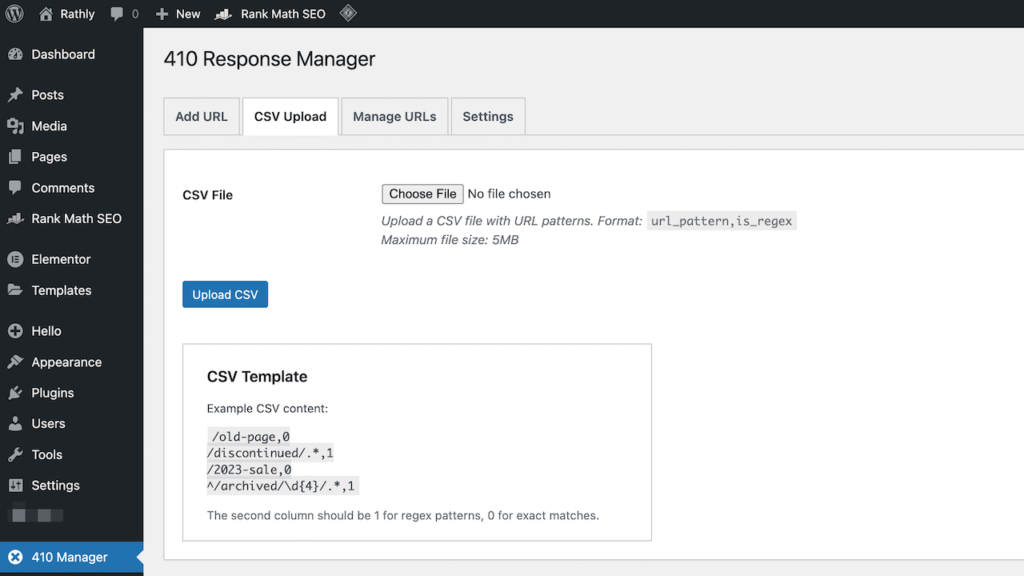
CSV import format
For larger cleanup jobs, CSV import saves time.
The CSV file uses two columns:
url_pattern,is_regexThe url_pattern column contains the URL path or regex pattern.
The is_regex column tells the plugin whether the row should use regex.
| Value | Meaning |
|---|---|
| 0 | Exact URL match |
| 1 | Regex pattern |
Example:
url_pattern,is_regex
/old-product,0
^/products/deprecated/.*,1
/removed-section,0
/archive/2020/.*,1
This format works well after an SEO audit, content pruning project, WooCommerce cleanup, or website migration.
Should you convert all 404s to 410s?
The plugin includes an option to convert all 404 responses to 410 responses.
This can be useful, but it should be used carefully.
It may make sense when your site is small, recently cleaned up, or you already know that missing URLs are permanently removed.
For larger websites, not every 404 should become a 410. Some 404s come from typos, spam URLs, temporary mistakes, broken external links, or URLs that never existed.
A safer workflow:
- Review missing URLs in Google Search Console.
- Redirect URLs that have a useful replacement.
- Return 410 for URLs that are gone forever.
- Leave unknown missing URLs as 404.
- Remove old internal links and sitemap entries.
That keeps your status codes accurate.
Performance impact
410 Response Manager is built for minimal performance impact.
The plugin does not add front-end scripts. It uses caching to reduce repeated work. It keeps database queries low and checks URL patterns only when needed.
For most WordPress sites, the plugin should have a small performance footprint.
If you plan to use many complex regex rules, keep them organized and test them carefully. Clean, specific patterns are better than broad patterns that match too much.
Security features
The plugin includes security checks for safe URL management inside WordPress.
| Security feature | What it does |
|---|---|
| Input validation | Checks submitted URL patterns |
| Data sanitization | Cleans stored values |
| Nonce verification | Protects admin actions |
| Capability checks | Limits access to approved users |
| Safe CSV handling | Reduces risk during imports |
| Regex validation | Catches pattern errors before saving |
These checks help keep URL rules, CSV uploads, and admin actions safer.
Installation
Upload the plugin files to:
/wp-content/plugins/410-response-managerThen follow these steps:
- Activate the plugin in your WordPress admin panel.
- Open 410 Manager from the admin menu.
- Add URL patterns manually or import a CSV file.
- Choose exact match or regex for each rule.
- Test removed URLs with a status code checker.
- Review Google Search Console after search engines recrawl the URLs.
Who should use this plugin?
410 Response Manager is built for anyone who needs better control over permanently removed WordPress URLs.
It is a good fit for SEO professionals, WooCommerce stores, content teams, developers, agencies, publishers, and site owners cleaning up deleted URLs.
If your site only has one or two broken links, you may not need a dedicated 410 tool. But if deleted URLs keep showing up in reports, this plugin gives you a cleaner way to manage them.
Best practices for using 410 responses
Use 410 responses with a clear plan. They work best when you know the content is truly gone.
Before adding a URL, ask:
- Does this page have a useful replacement?
- Does it have backlinks worth preserving?
- Does it still get traffic?
- Is the content outdated, thin, or removed for a reason?
- Should users land somewhere else instead?
If there is a useful replacement, use a 301 redirect.
If the page is permanently removed and no replacement exists, use a 410.
Also check your internal links. A 410 response should not be the first fix for a URL that is still linked from your menus, blog posts, XML sitemap, or product feeds. Remove or update those links too.
A cleaner way to retire old WordPress URLs
Deleted content should not become a long-term cleanup problem.
410 Response Manager helps you send an HTTP 410 Gone response in WordPress for pages that are permanently removed. It gives you manual rules, regex support, CSV import, bulk management, and optional 404-to-410 conversion from one WordPress admin screen.
Use it when content is gone. Redirect when a better page exists. Leave unknown missing URLs as 404.
That simple approach keeps your site cleaner for users, search engines, and your SEO team.
Frequently Asked Questions
What is an HTTP 410 Gone response in WordPress?
An HTTP 410 Gone response in WordPress tells browsers and search engines that a URL was permanently removed. It means the page used to exist, but it is gone and is not expected to return. It is useful for deleted products, outdated posts, expired pages, and removed site sections.
Is 410 better than 404 for SEO?
A 410 is better when a URL was intentionally removed and has no replacement. A 404 is better when the page is simply missing or the reason is unknown. Both status codes can remove URLs from search results after crawling, but 410 gives a clearer permanent removal signal.
Should I redirect deleted pages instead of using 410?
Redirect deleted pages when there is a close replacement. Use 410 when there is no useful replacement. For example, redirect an old service page to a new version, but use 410 for an outdated post, expired event, or discontinued product with no alternative.
Can I use regex for 410 responses?
Yes. 410 Response Manager supports regular expressions. Regex lets you match many URLs with one rule, such as an old product folder, removed archive path, or deprecated API section. The plugin validates regex patterns before saving them.
Can I import 410 URLs with a CSV file?
Yes. You can import URL patterns with a CSV file using two columns: url_pattern and is_regex. Use 0 for exact URL matches and 1 for regex patterns. This is useful after SEO audits, content pruning, product cleanup, and website migrations.
Will this plugin slow down my WordPress site?
410 Response Manager is built for minimal performance impact. It uses caching, avoids front-end scripts, and keeps database activity low. For best results, keep regex rules specific and avoid overly broad patterns that match more URLs than intended.