Change Author Base is a free WordPress plugin from Rathly that lets you replace the default /author/ part of your author archive URLs with a custom base like /team/, /writers/, /experts/, or /profile/.
WordPress creates author archive pages by default. That works fine for many blogs, but example.com/author/jane-doe/ doesn’t always fit a business website. A law firm may want attorney profiles under /attorneys/. A medical practice may want providers under /doctors/. A marketing agency may want team pages under /team/.
Our plugin gives you a cleaner way to match author URLs to your website structure without editing theme files or touching PHP.
Change Author Base for cleaner WordPress author URLs
By default, WordPress author archive URLs follow this format:
example.com/author/username/
With Change Author Base WordPress plugin, you can replace author with a word that fits your brand:
example.com/team/username/
example.com/writers/username/
example.com/experts/username/
example.com/attorneys/username/
example.com/providers/username/
That small URL change can make your site feel more polished. It also helps visitors understand where they are before they even load the page.
Author base vs author slug
These two terms sound similar, but they are not the same thing.
| URL part | Example | What it means |
|---|---|---|
| Author base | /author/ | The shared URL section used for all author archive pages. |
| Author slug | /jane-doe/ | The unique part tied to one user or author. |
| Full author URL | /author/jane-doe/ | The full archive URL for that person. |
Change Author Base focuses on the shared base. It changes the /author/ part of the URL. If you also need to edit individual usernames or author slugs, handle that separately with a user slug tool, custom code, or a full author profile setup.
When to use Change Author Base
This plugin is useful when your author pages are more than basic blog archives. For many business sites, author pages support trust. They show who wrote the content, why that person knows the topic, and how visitors can learn more about the team behind the website.
Good use cases include:
- Law firms that want URLs like
/attorneys/jane-smith/ - Medical and dental practices that want
/providers/dr-lee/ - Agencies that want
/team/harry-laurel/ - News sites that want
/writers/maria-gomez/ - Education sites that want
/instructors/robert-jones/ - Multi-author blogs that want more branded author archives
If your author pages are indexed, linked in blog posts, or used as proof of expertise, the URL should look intentional. A clean author base works like a hallway sign in an office. Visitors know where they are going before they open the door.
How Change Author Base helps SEO and site structure
A custom author base will not rank a page by itself. SEO still depends on useful content, technical health, internal links, and trust signals. But better author URLs can support a cleaner site structure.
For example, a law firm publishing legal guides may want author archives under /attorneys/ because the writers are also practicing lawyers. A clinic may prefer /providers/ because patients look for real doctors, dentists, or care team members. That structure feels more natural than the default /author/.
For deeper SEO work, our SEO services team looks at author pages, internal links, content quality, and technical crawl issues together. URLs matter, but they work best when the rest of the site backs them up.
Before changing author URLs on a live site
Changing URLs can affect traffic if old URLs already receive visits or backlinks. Before updating your author base, check these items:
- Search Console clicks for existing author archive pages
- Internal links pointing to old author URLs
- Backlinks pointing to author archives
- Author schema, breadcrumbs, and sitemap settings
- Redirect rules from the old base to the new base
If your old author URLs are already indexed, add 301 redirects from the old structure to the new one. For example, redirect /author/jane-doe/ to /team/jane-doe/. This helps users and search engines land on the right page.
Plugin screenshots
Features
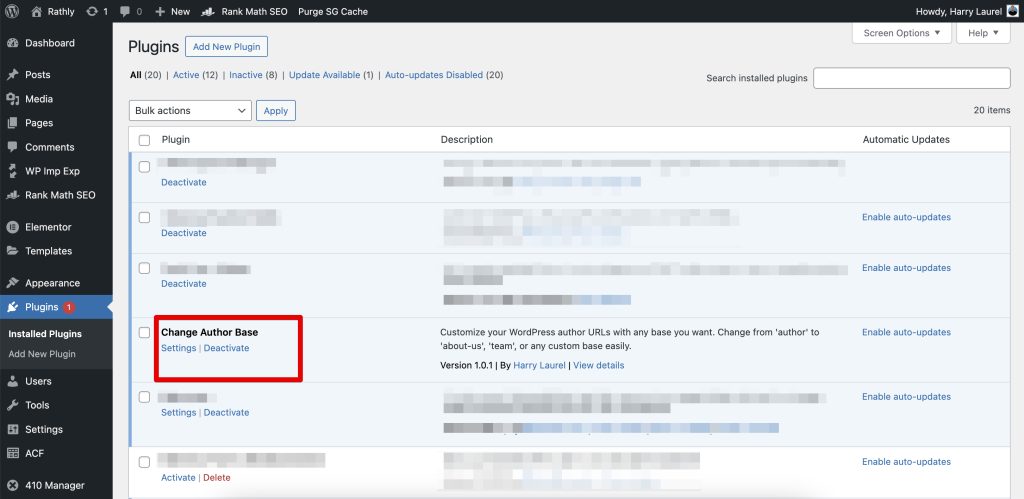
Change Author Base is built for site owners who want a simple author URL setting without adding a heavy permalink plugin.
- Change the default WordPress
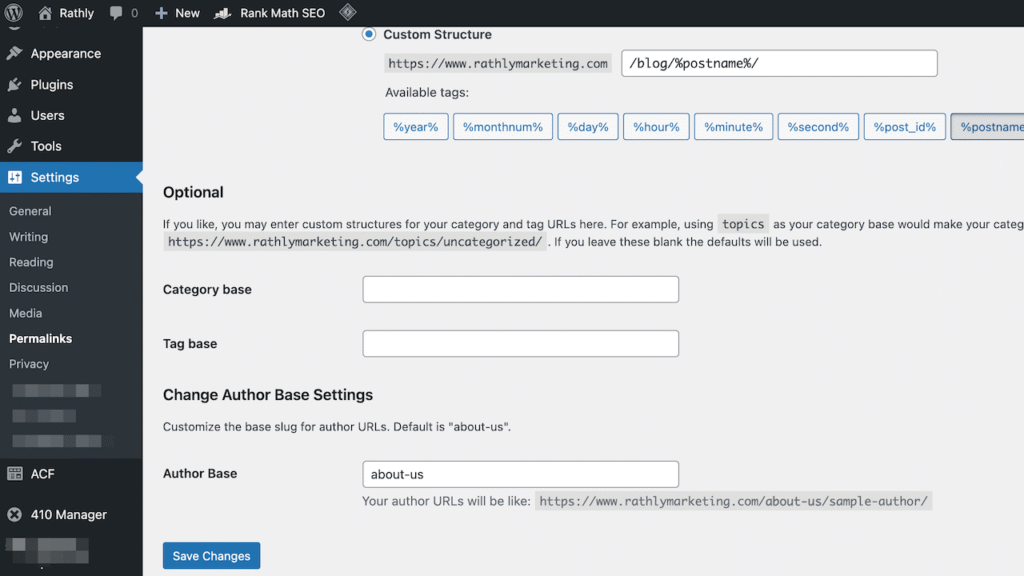
/author/base - Set a custom base from Settings → Permalinks
- Preview the new author URL while editing
- Keep settings after deactivation and reactivation
- Remove settings only on uninstall
- Clean special characters from the custom base
- Works with WordPress multisite
- No custom code needed
How to install Change Author Base
Install from WordPress
- Log in to your WordPress dashboard.
- Go to Plugins → Add New.
- Search for “Change Author Base.”
- Click Install Now.
- Click Activate.
Install from a ZIP file
- Download the plugin ZIP file from WordPress.org or GitHub.
- Go to Plugins → Add New in WordPress.
- Click Upload Plugin.
- Choose the ZIP file.
- Click Install Now, then Activate.
How to configure Change Author Base
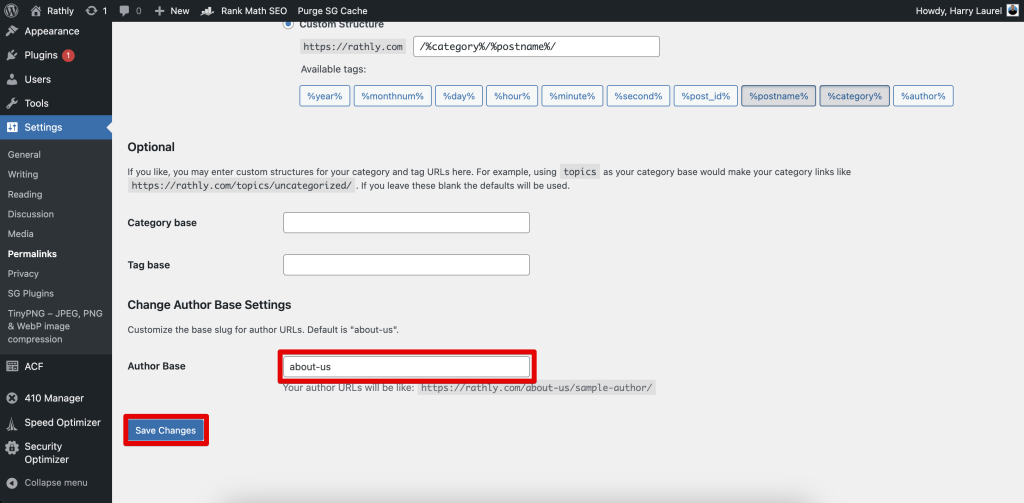
- Go to Settings → Permalinks.
- Find the custom author base field.
- Enter your new base, such as
team,writers,experts,attorneys, orproviders. - Click Save Changes.
- Open one author archive page and test the new URL.
After saving, WordPress refreshes its permalink rules. If the new URL gives a 404, return to Settings → Permalinks and save again. Also check for conflicts with pages, categories, custom post types, or plugins using the same slug.
What author base should you choose?
Pick a short word that matches how visitors think about your people. Avoid clever labels that only make sense to your team.
| Website type | Good author base ideas | Example URL |
|---|---|---|
| Law firm | attorneys, lawyers, team | /attorneys/jane-smith/ |
| Dental practice | dentists, providers, team | /dentists/dr-lee/ |
| Medical practice | providers, doctors, clinicians | /providers/dr-patel/ |
| Agency | team, experts, about-us | /team/harry-laurel/ |
| Publisher | writers, contributors, editors | /writers/maria-gomez/ |
Do not use a slug that already belongs to another page. If your website already has a page at /team/, test carefully before using team as the author base. When in doubt, choose a more specific option like team-members or contributors.
Change Author Base compared with other options
You have a few ways to change WordPress author URLs. The right choice depends on how much control you need.
| Option | Best for | Watch out for |
|---|---|---|
| Change Author Base | Changing /author/ to one custom base | Does not replace a full author profile system |
| Full author slug plugin | Changing both the base and each user slug | More settings than some sites need |
| Custom code | Developers who want full control | Theme changes can break or remove the code |
| Large permalink plugin | Sites with many custom URL rules | May be too much for one small URL change |
If you only want to replace /author/, this plugin keeps the job simple. If your site needs custom profile pages, author images, and deeper author proof, pair this page with our Custom Author Avatar plugin or talk with our web design team about a custom author layout.
Requirements
- WordPress 6.0 or higher
- PHP 7.4 or higher
- Pretty permalinks turned on
- Administrator access to WordPress settings
For best results, test URL changes on a staging site first. Our WordPress hosting plans include staging tools, backups, SSL, malware scanning, and developer access for safer updates.
Troubleshooting
The new author URL shows a 404
Go to Settings → Permalinks and click Save Changes again. This refreshes rewrite rules. If the issue remains, check whether another page, category, plugin, or custom post type already uses the same slug.
The old author URLs still appear in Google
Google may keep old URLs for a while after a change. Add 301 redirects from old author URLs to new author URLs, update internal links, and check your sitemap settings. If some author archives should no longer exist, our 410 Response Manager plugin can help remove dead URLs cleanly.
The author base saves, then changes back
Check for permalink plugins, security plugins, custom code, or theme functions that may be changing rewrite settings. Also confirm that your user account has administrator access.
Build author pages visitors can trust
A better author URL is a start. The page itself still needs to earn trust. Add a real bio, photo, credentials, related posts, contact options, and links to social or professional profiles where appropriate.
At Rathly, we care about author pages because they sit at the intersection of SEO, design, and trust. The right URL helps. The right content closes the gap between “Who wrote this?” and “I trust this source.”
Need help cleaning up WordPress URLs, author pages, or plugin conflicts? Contact Rathly and we’ll take a practical look at your setup.
Frequently asked questions
Do I need redirects after changing the author base?
Use 301 redirects if your old author URLs already receive traffic, have backlinks, or appear in Google. Redirects help visitors and search engines reach the new URL instead of landing on a 404 page. New sites with no indexed author pages may not need redirects.
Will Change Author Base work with my WordPress theme?
The plugin should work with themes that follow standard WordPress author archive behavior. If your theme uses custom author templates or a page builder module for profiles, test the change on staging first. Also check for conflicts with permalink, membership, or author profile plugins.
What happens if I deactivate the plugin?
If you deactivate the plugin, WordPress returns to the default author base. Your posts, users, and author archives stay in WordPress. The URL structure changes back, so review redirects and internal links before turning the plugin off on a live website.